This blog post explores how to use the Dapr Configuration building block to keep application configuration outside the application code, while still giving the application a simple way to read values and react to changes at runtime. By supporting different configuration stores through one consistent API, Dapr lets the underlying provider change without forcing the application to learn a provider-specific SDK.
Aspire ties it all together, orchestrating the application projects, the Dapr sidecar, and the supporting RedisInsight container so the local distributed application is easier to run, inspect, and observe.
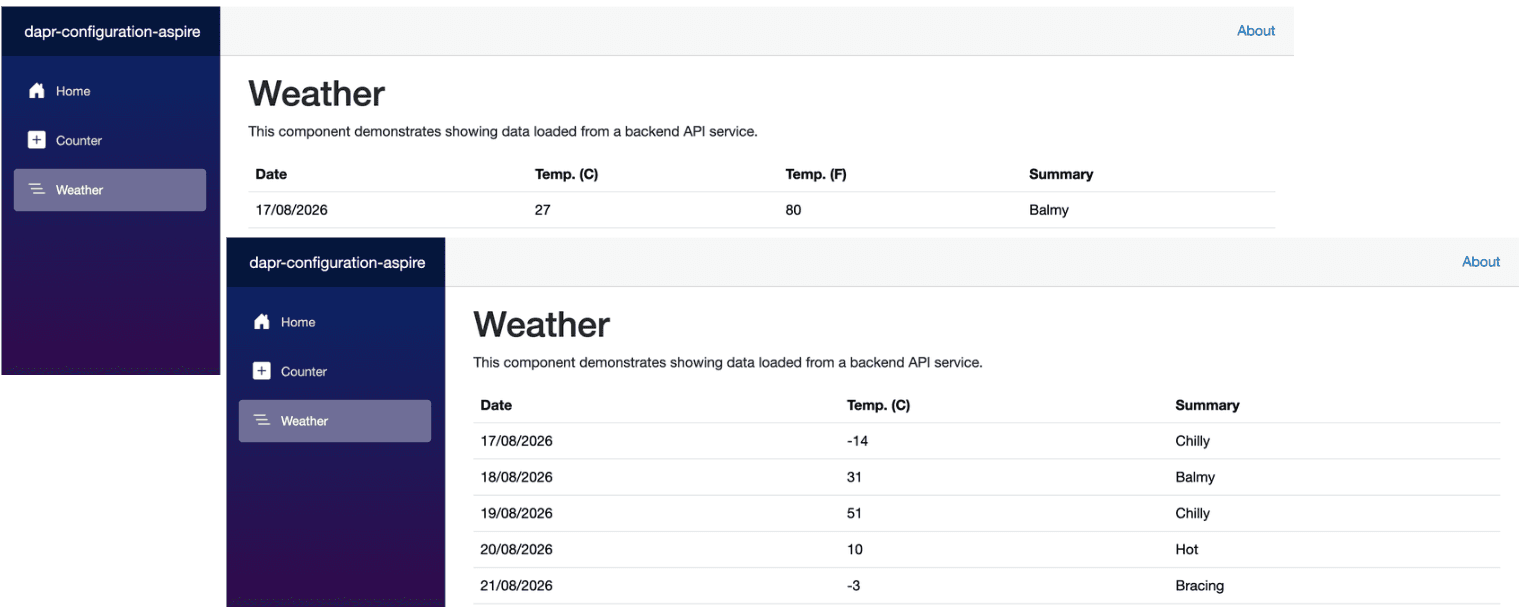
The demo app uses Redis as the Dapr configuration store. A single key controls whether the Blazor Weather page shows the Temp. (F) column.
Here's a glimpse of the demo app, built up incrementally throughout this post.
Prerequisites
- Docker Desktop - Docker Desktop provides a local container runtime and management experience.
- .NET Aspire - Aspire gives you a unified, code-first toolkit to compose, debug, and observe distributed apps from a single AppHost.
- Dapr CLI - Dapr CLI initializes the local Dapr runtime and helps inspect Dapr sidecar behavior.
- Redis - Redis is the backing configuration store used by the demo.
- RedisInsight - RedisInsight gives you a UI to inspect and update Redis keys while the app is running.
Demo App
The demo app is based on the Aspire starter template, which includes a frontend (ASP.NET Core Blazor App), a backend (ASP.NET Core Minimal API), ServiceDefaults, and an AppHost project.
dotnet new aspire-starter --output dapr-configuration-aspireThe solution structure should look similar to the one below.
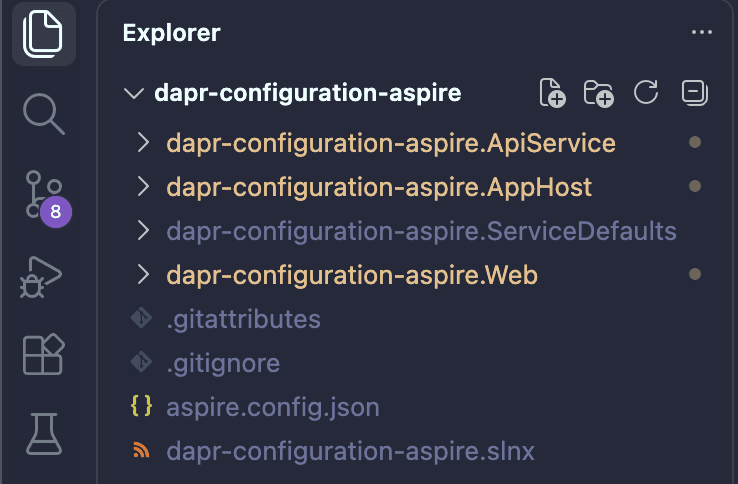
With the initial structure in place, let's move on to the AppHost.
App Host
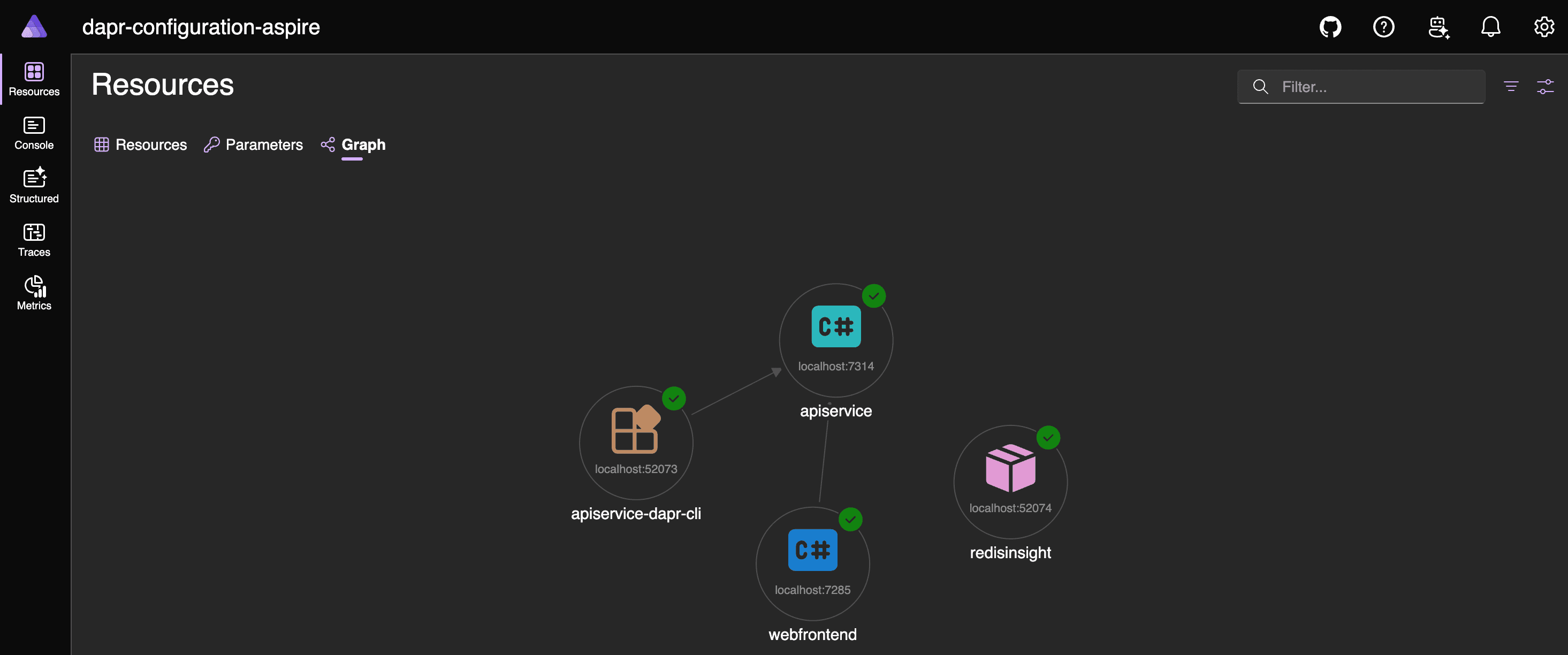
Aspire's AppHost is where the distributed application is declared, code-first. In this demo, it adds the Dapr configuration component, attaches it to the API service's Dapr sidecar, adds a RedisInsight container, and wires the Blazor frontend to the API service through Aspire service discovery.
Start by adding the CommunityToolkit.Aspire.Hosting.Dapr NuGet package to the AppHost project. It provides extension methods and resource definitions for an Aspire AppHost to configure Dapr resources.
dotnet add package CommunityToolkit.Aspire.Hosting.DaprCreate the folder structure shown below to keep the Dapr component file organized.
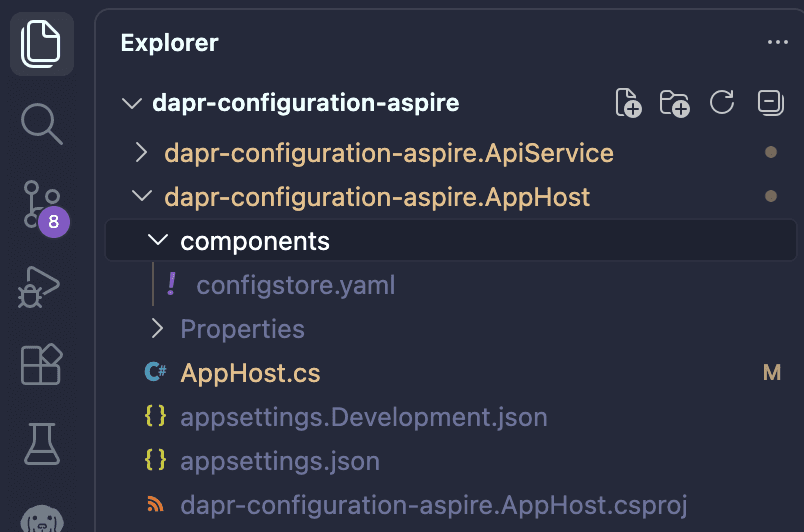
components/configstore.yaml
It defines a Dapr configuration store named configstore, backed by Redis on localhost:6379.
apiVersion: dapr.io/v1alpha1
kind: Component
metadata:
  name: configstore
spec:
  type: configuration.redis
  version: v1
  metadata:
  - name: redisHost
    value: localhost:6379
  - name: redisPassword
    value: ""
AppHost.cs
using CommunityToolkit.Aspire.Hosting.Dapr;

var builder = DistributedApplication.CreateBuilder(args);

// Dapr Configuration Store
var configStore = builder.AddDaprStateStore("configstore", new DaprComponentOptions
{
    LocalPath = "components/configstore.yaml"
});

// RedisInsight GUI
builder.AddContainer("redisinsight", "redis/redisinsight", "latest")
    .WithEndpoint(targetPort: 5540, scheme: "http", name: "http", isExternal: true)
    .WithEnvironment("RI_APP_HOST", "0.0.0.0")
    .WithEnvironment("RI_APP_PORT", "5540")
    .WithEnvironment("RI_REDIS_HOST", "host.docker.internal")
    .WithEnvironment("RI_REDIS_PORT", "6379")
    .WithEnvironment("RI_REDIS_ALIAS", "Dapr configstore Redis")
    .WithUrlForEndpoint("http", url =>
    {
        url.Url = "/";
        url.DisplayText = "Redis Insight";
    });

// ApiService
var apiService = builder.AddProject<Projects.dapr_configuration_aspire_ApiService>("apiservice")
    .WithHttpHealthCheck("/health")
    .WithDaprSidecar(sidecar => sidecar.WithReference(configStore))
    .WithUrlForEndpoint("http", url =>
    {
        url.Url = "/";
        url.DisplayText = "API Service";
    })
    .WithUrlForEndpoint("https", url =>
    {
        url.Url = "/";
        url.DisplayText = "API Service";
    });

// Web App
builder.AddProject<Projects.dapr_configuration_aspire_Web>("webfrontend")
    .WithExternalHttpEndpoints()
    .WithHttpHealthCheck("/health")
    .WithReference(apiService)
    .WaitFor(apiService)
    .WithUrlForEndpoint("http", url =>
    {
        url.Url = "/";
        url.DisplayText = "Web App";
    })
    .WithUrlForEndpoint("https", url =>
    {
        url.Url = "/";
        url.DisplayText = "Web App";
    });

builder.Build().Run();
It's important to note that the API Service does not need a Redis connection string, and it does not call Redis directly.
The following diagram depicts the application topology.

API Service
It is an ASP.NET Minimal API that uses DaprClient to read and subscribe to configuration. It does not read from Redis directly.
Begin by adding the Dapr.AspNetCore package to the API project.
dotnet add package Dapr.AspNetCoreProgram.cs
using Dapr.Client;
using System.Collections.Concurrent;
using System.Text.Json.Serialization;
using System.Threading.Channels;

var builder = WebApplication.CreateBuilder(args);

builder.AddServiceDefaults();

builder.Services.AddDaprClient();
builder.Services.AddSingleton<WeatherConfigurationState>();
builder.Services.AddHostedService<WeatherConfigurationSubscriber>();
builder.Services.AddProblemDetails();

builder.Services.AddOpenApi();

var app = builder.Build();

app.UseExceptionHandler();

if (app.Environment.IsDevelopment())
{
    app.MapOpenApi();
}

string[] summaries = ["Freezing", "Bracing", "Chilly", "Cool", "Mild", "Warm", "Balmy", "Hot", "Sweltering", "Scorching"];

app.MapGet("/", () => "API service is running. Navigate to /weatherforecast to see sample data.");

app.MapGet("/weatherforecast", (WeatherConfigurationState weatherConfiguration) =>
{
    var showTemperatureF = weatherConfiguration.ShowTemperatureF;

    var forecast = Enumerable.Range(1, 5).Select(index =>
    {
        var temperatureC = Random.Shared.Next(-20, 55);

        return
        new WeatherForecast
        (
            DateOnly.FromDateTime(DateTime.Now.AddDays(index)),
            temperatureC,
            showTemperatureF ? 32 + (int)(temperatureC / 0.5556) : null,
            summaries[Random.Shared.Next(summaries.Length)]
        );
    })
        .ToArray();

    return forecast;
})
.WithName("GetWeatherForecast");

app.MapGet("/weatherconfiguration/showTemperatureF/stream", async (
    WeatherConfigurationState weatherConfiguration,
    HttpContext httpContext,
    CancellationToken cancellationToken) =>
{
    httpContext.Response.Headers.CacheControl = "no-cache";
    httpContext.Response.ContentType = "text/event-stream";

    await using var subscription = weatherConfiguration.SubscribeShowTemperatureF();

    try
    {
        await foreach (var showTemperatureF in subscription.ReadAllAsync(cancellationToken))
        {
            await httpContext.Response.WriteAsync("event: showTemperatureF\n", cancellationToken);
            await httpContext.Response.WriteAsync($"data: {showTemperatureF.ToString().ToLowerInvariant()}\n\n", cancellationToken);
            await httpContext.Response.Body.FlushAsync(cancellationToken);
        }
    }
    catch (OperationCanceledException) when (cancellationToken.IsCancellationRequested)
    {
    }
})
.WithName("WatchShowTemperatureF");

app.MapDefaultEndpoints();

app.Run();

sealed class WeatherConfigurationState
{
    private readonly ConcurrentDictionary<Guid, Channel<bool>> subscribers = [];
    private int showTemperatureF;

    public bool ShowTemperatureF => Volatile.Read(ref showTemperatureF) == 1;

    public bool SetShowTemperatureF(string? value, ILogger logger)
    {
        if (bool.TryParse(value, out var parsed))
        {
            SetShowTemperatureF(parsed);
            return true;
        }

        logger.LogWarning(
            "Configuration value {Value} for {Key} is not a valid boolean. Hiding Fahrenheit column.",
            value,
            WeatherConfigurationKeys.ShowTemperatureFKey);

        SetShowTemperatureF(false);
        return false;
    }

    public void SetShowTemperatureF(bool value)
    {
        var current = value ? 1 : 0;
        var previous = Interlocked.Exchange(ref showTemperatureF, current);
        if (previous == current)
        {
            return;
        }

        foreach (var subscriber in subscribers.Values)
        {
            subscriber.Writer.TryWrite(value);
        }
    }

    public WeatherConfigurationSubscription SubscribeShowTemperatureF()
    {
        var id = Guid.NewGuid();
        var channel = Channel.CreateUnbounded<bool>(new UnboundedChannelOptions
        {
            SingleReader = true,
            SingleWriter = false
        });

        subscribers[id] = channel;
        channel.Writer.TryWrite(ShowTemperatureF);

        return new WeatherConfigurationSubscription(channel.Reader, () =>
        {
            if (subscribers.TryRemove(id, out var removed))
            {
                removed.Writer.TryComplete();
            }
        });
    }
}

sealed class WeatherConfigurationSubscription(ChannelReader<bool> reader, Action unsubscribe) : IAsyncDisposable
{
    public IAsyncEnumerable<bool> ReadAllAsync(CancellationToken cancellationToken) => reader.ReadAllAsync(cancellationToken);

    public ValueTask DisposeAsync()
    {
        unsubscribe();
        return ValueTask.CompletedTask;
    }
}

sealed class WeatherConfigurationSubscriber(
    DaprClient daprClient,
    WeatherConfigurationState state,
    ILogger<WeatherConfigurationSubscriber> logger) : BackgroundService
{
    private static readonly TimeSpan RetryDelay = TimeSpan.FromSeconds(5);

    protected override async Task ExecuteAsync(CancellationToken stoppingToken)
    {
        while (!stoppingToken.IsCancellationRequested)
        {
            string? subscriptionId = null;
            SubscribeConfigurationResponse? subscription = null;

            try
            {
                await ReadInitialValueAsync(stoppingToken);

                subscription = await daprClient.SubscribeConfiguration(
                    WeatherConfigurationKeys.ConfigStoreName,
                    [WeatherConfigurationKeys.ShowTemperatureFKey],
                    metadata: null,
                    cancellationToken: stoppingToken);

                subscriptionId = subscription.Id;
                logger.LogInformation(
                    "Subscribed to {Key} in Dapr configuration store {Store} with subscription {SubscriptionId}.",
                    WeatherConfigurationKeys.ShowTemperatureFKey,
                    WeatherConfigurationKeys.ConfigStoreName,
                    subscriptionId);

                await foreach (var items in subscription.Source.WithCancellation(stoppingToken))
                {
                    if (!string.IsNullOrWhiteSpace(subscription.Id))
                    {
                        subscriptionId = subscription.Id;
                    }

                    foreach (var item in items)
                    {
                        if (item.Key == WeatherConfigurationKeys.ShowTemperatureFKey)
                        {
                            state.SetShowTemperatureF(item.Value.Value, logger);
                        }
                    }
                }
            }
            catch (OperationCanceledException) when (stoppingToken.IsCancellationRequested)
            {
            }
            catch (Exception ex)
            {
                logger.LogWarning(
                    ex,
                    "Dapr configuration subscription failed for {Key} in {Store}. Retrying.",
                    WeatherConfigurationKeys.ShowTemperatureFKey,
                    WeatherConfigurationKeys.ConfigStoreName);
            }
            finally
            {
                if (string.IsNullOrWhiteSpace(subscriptionId))
                {
                    subscriptionId = subscription?.Id;
                }

                if (!string.IsNullOrWhiteSpace(subscriptionId))
                {
                    await UnsubscribeAsync(subscriptionId);
                }
            }

            if (!stoppingToken.IsCancellationRequested)
            {
                await Task.Delay(RetryDelay, stoppingToken);
            }
        }
    }

    private async Task ReadInitialValueAsync(CancellationToken cancellationToken)
    {
        try
        {
            var configuration = await daprClient.GetConfiguration(
                WeatherConfigurationKeys.ConfigStoreName,
                [WeatherConfigurationKeys.ShowTemperatureFKey],
                metadata: null,
                cancellationToken);

            if (configuration.Items.TryGetValue(WeatherConfigurationKeys.ShowTemperatureFKey, out var item))
            {
                state.SetShowTemperatureF(item.Value, logger);
                return;
            }

            state.SetShowTemperatureF(false);
        }
        catch (Exception ex)
        {
            logger.LogWarning(
                ex,
                "Could not read {Key} from Dapr configuration store {Store}. Hiding Fahrenheit column.",
                WeatherConfigurationKeys.ShowTemperatureFKey,
                WeatherConfigurationKeys.ConfigStoreName);
            state.SetShowTemperatureF(false);
        }
    }

    private async Task UnsubscribeAsync(string subscriptionId)
    {
        try
        {
            var response = await daprClient.UnsubscribeConfiguration(
                WeatherConfigurationKeys.ConfigStoreName,
                subscriptionId,
                CancellationToken.None);

            if (!response.Ok)
            {
                logger.LogWarning(
                    "Dapr configuration unsubscribe failed for subscription {SubscriptionId}: {Message}",
                    subscriptionId,
                    response.Message);
            }
        }
        catch (Exception ex)
        {
            logger.LogWarning(
                ex,
                "Could not unsubscribe Dapr configuration subscription {SubscriptionId}.",
                subscriptionId);
        }
    }
}

static class WeatherConfigurationKeys
{
    public const string ConfigStoreName = "configstore";
    public const string ShowTemperatureFKey = "weather:showTemperatureF";
}

record WeatherForecast(
    DateOnly Date,
    int TemperatureC,
    [property: JsonIgnore(Condition = JsonIgnoreCondition.WhenWritingNull)] int? TemperatureF,
    string? Summary);
What's notable here is that DaprClient is the only configuration dependency the API service has. Instead of connecting to Redis directly, it communicates with the Dapr sidecar through configstore. To keep things fast, WeatherConfigurationState caches weather:showTemperatureF, letting /weatherforecast quickly determine whether to include TemperatureF. Any runtime changes are streamed in real time through /weatherconfiguration/showTemperatureF/stream as server-sent events, with WeatherConfigurationSubscriber responsible for the initial read, subscription updates, retries, and cleanup.
Service Defaults
There's no change in the ServiceDefaults project. It remains as it was generated by the template.
Web App
To keep this post focused on the core functionality of Dapr Configuration, I've left out the web app's code snippets. It's a simple Blazor application, built purely to demonstrate the complete flow, and one that readers should find straightforward to recreate on their own. That said, if you'd like access to the code, feel free to get in touch.
Running the App
With almost everything in place, let's run the application.
aspire runAfter a successful run, open the Aspire dashboard. and select the webfrontend resource, and navigate to Weather page.
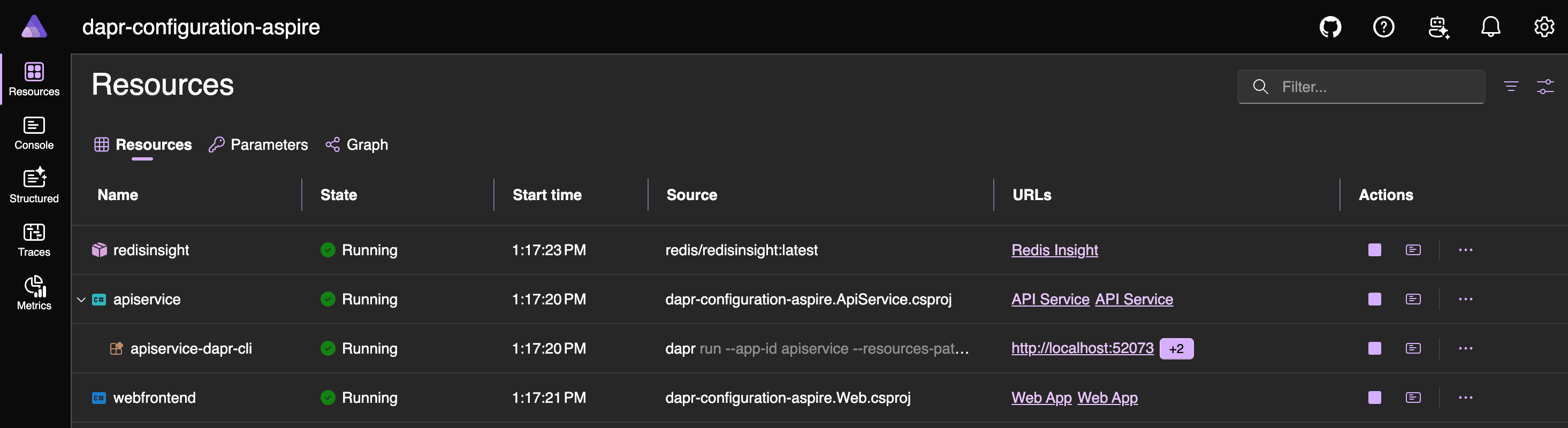
The weather:showTemperatureF flag controls whether the Web UI displays the Temp (F) column. You can toggle it using a CLI command (via the host machine, if redis-cli is installed, or from inside the Redis container) or the RedisInsight UI, then observe the change.
# From Host Machine
redis-cli SET weather:showTemperatureF true
redis-cli SET weather:showTemperatureF false
# From inside Redis container
docker exec -it dapr_redis redis-cli SET weather:showTemperatureF true
docker exec -it dapr_redis redis-cli SET weather:showTemperatureF false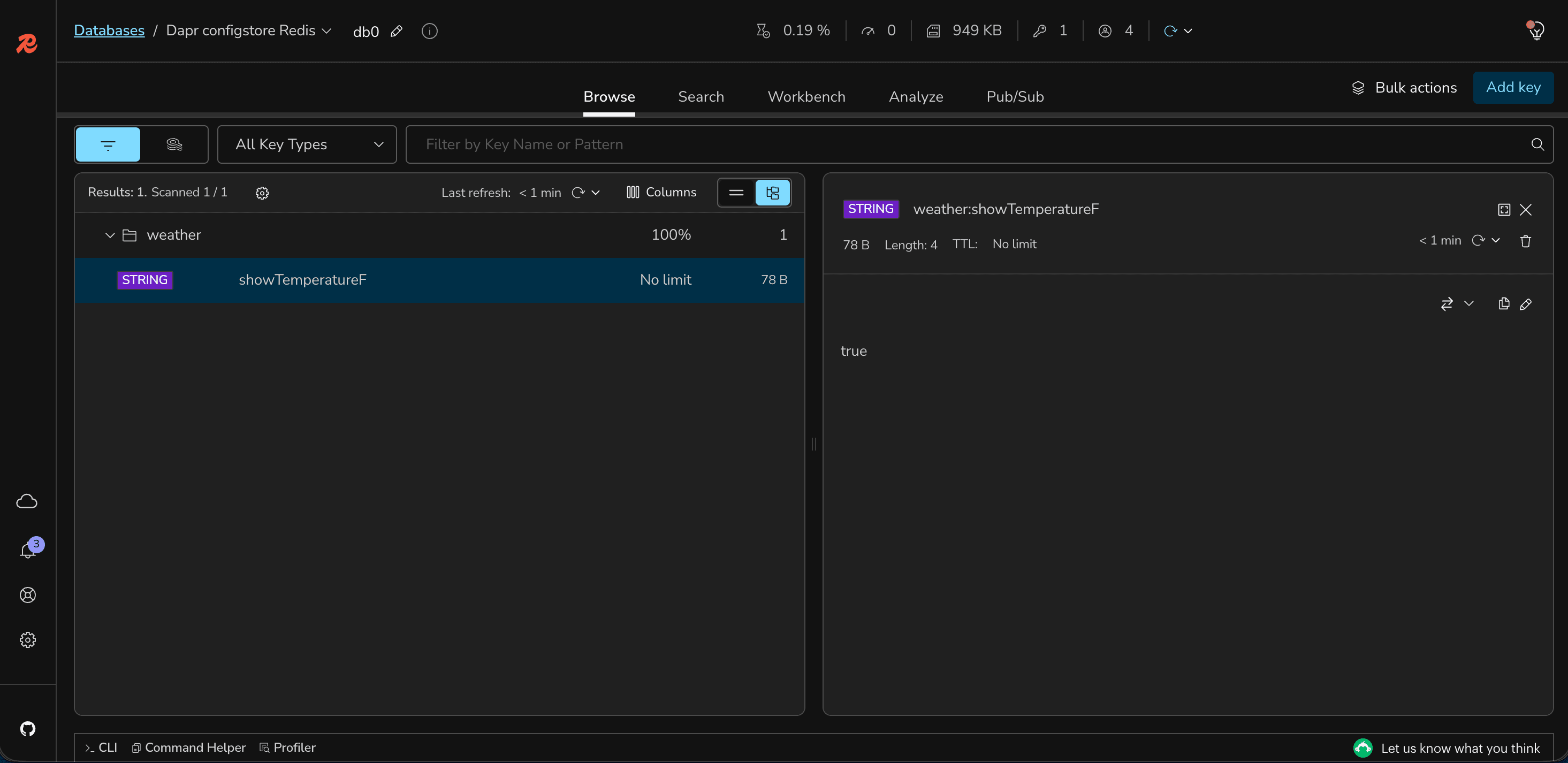
Conclusion
In this demo, Redis quietly held the configuration value while the real magic happened elsewhere: toggling the flag via CLI or RedisInsight rippled straight through to the Blazor Weather page in real time: no redeploy, no manual refresh, just the API service's long-running subscription catching the change and pushing it live to the UI.
That's the real payoff of Dapr Configuration: the application never once needed to know Redis was behind the curtain. Swap in a different configuration store, and the application code stays the same; only the component definition changes. Paired with Aspire's local orchestration, the entire journey from a single config flip to a live UI update stayed visible and easy to trace, start to finish.